Native apps, and Unity/Unreal/canvas UIs with no accessibility tree — vision grounding reads the pixels.
macOS · Apple Silicon · iOS & Android testing
Your app, tested by AI that never phones home.
Type “test my app’s login flow.” Argus plans the steps, drives a real device or simulator, catches crashes and broken screens, and hands you the report — with every model running locally on your Mac. Offline. Private. Yours.
- 14:02:11◆ planner 4-step plan proposed — approved
- 14:02:13⚲ found “Email” field via accessibility
- 14:02:14⌨ type test@example.com
- 14:02:15⚲ found “Password” field via accessibility
- 14:02:16⌨ type ••••••••
- 14:02:17▲ dismissed notification permission prompt
- 14:02:18👁 tap “Sign In” — highlighted before acting
- 14:02:21✓ home screen reached — no errors on screen
- 14:02:21✓ PASSED · 4/4 steps · exported maestro flow
Local by defaultModels, screenshots, and run history stay on your Mac.
Real device coverageiOS, Android, simulators, emulators, and physical handsets.
Evidence you keepPortable reports and Maestro flows remain yours, always.
One window. Every device on your Mac.
Physical iPhones, iOS Simulators, and Android emulators — booted or not — all in one list. Pick a target, describe a test, and watch Argus plan and run it.
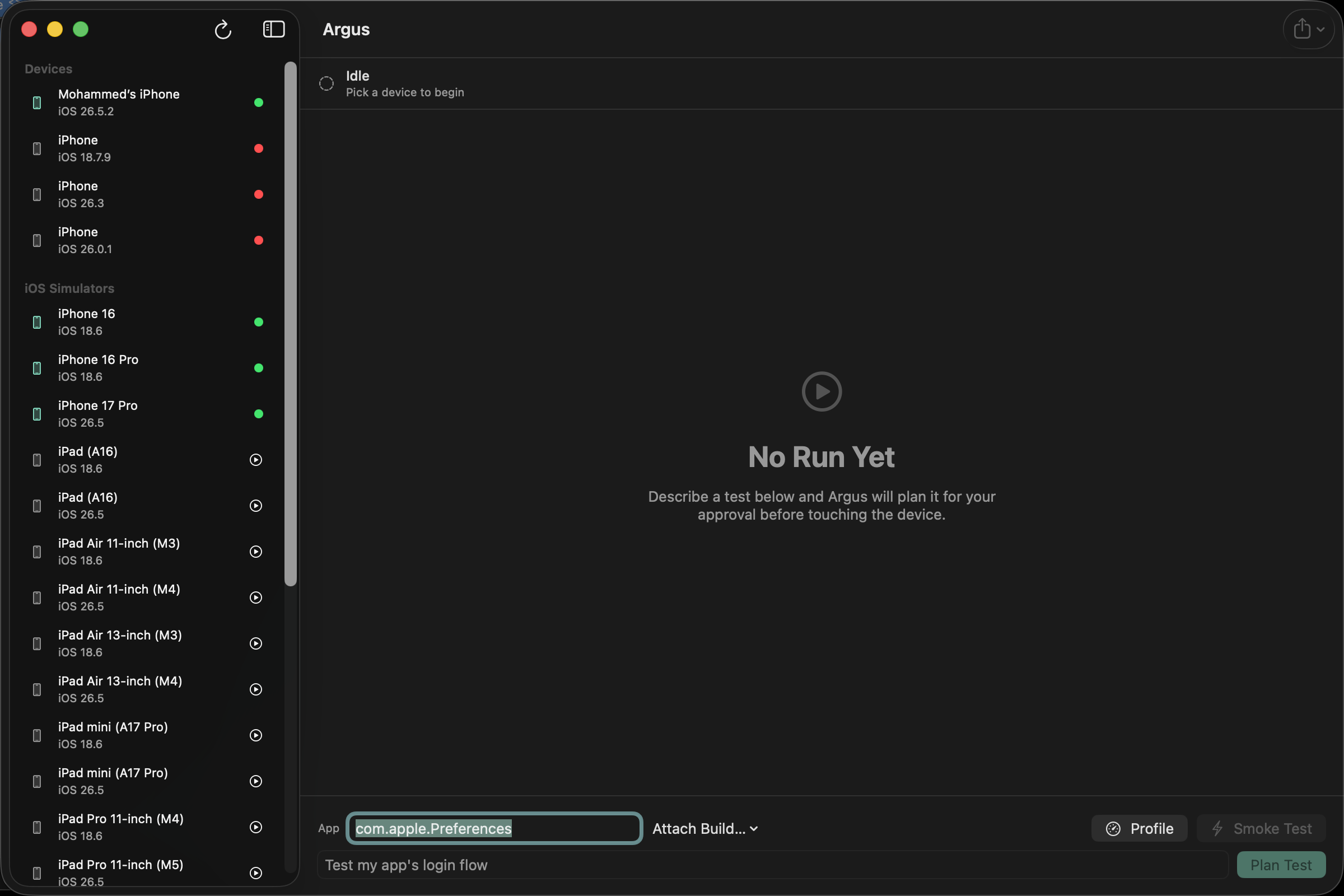
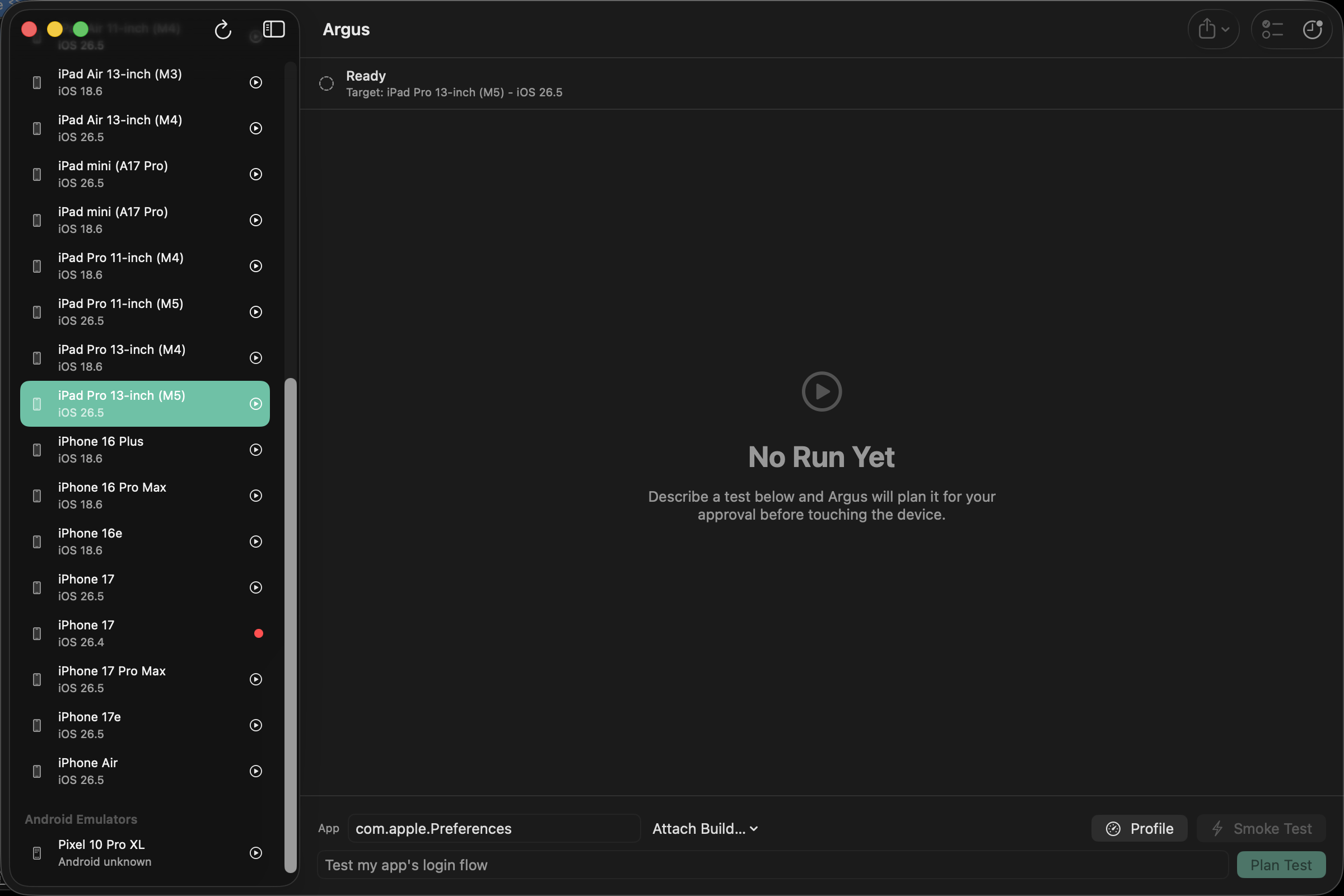
Describe. Approve. Watch it test.
No scripts, no selectors, no cloud device farm. Argus is a native macOS app that installs your build and drives it the way a careful tester would.
1.
Say what to test
“Test the login flow.” A local language model turns your sentence into a step plan — shown to you for edits and approval before anything touches the device.
2.
Argus drives the app
It reads each screen — accessibility tree first, computer vision when there isn’t one — taps, types, and swipes, dismissing stray permission prompts on the way.
3.
Keep the evidence
A screenshot-annotated report with crashes, frozen screens, and layout bugs — plus an exported Maestro flow your team can re-run forever, without Argus.
Everything between “new build” and “ship it.”
Any UI, any engine
System UI included
Permission dialogs, share sheets, and OS interstitials are understood and handled, not tripped over.
Real devices & simulators
iPhones over USB or Wi-Fi, iOS Simulators, Android emulators and handsets — one picker.
Build from source
Point at an Xcode or Gradle project; Argus finds the scheme, builds it, and installs the result.
Performance snapshot
Launch time, jank %, and memory-leak trends captured during the same run — opt-in, one toggle.
Visual regression
Known-good baselines per step; any screen that drifts gets flagged with the exact changed region.
Crash & freeze detection
Force-closes, ANRs, frozen screens, on-screen error text, and broken layouts — caught without asking.
Portable exports
Maestro YAML, Markdown, HTML, and PDF. Your tests and reports outlive your subscription.
Searchable history
Every run stored on your Mac — searchable by app, flow, date, and result. No cloud sync, by design.
Your screens are nobody’s data.
Every model Argus uses is open-weight and runs on your Mac’s own silicon. Screenshots, accessibility data, and app binaries never leave the machine. The only network call is the one-time model download — after that, pull the cable and test all day.
NO TELEMETRYNO CLOUD INFERENCENO SCREENSHOT UPLOADSWORKS OFFLINE
Every plan is the whole product.
One tier of features — full agent, every device type, every export. Pick the rhythm that fits. Your first 7 days in Argus are free; card details are required to start, and a small verification charge is refunded automatically. Card subscriptions only.
Loading current exchange rates…
Weekly
$5
per week · for release crunches
- Full agent, unlimited runs
- All devices & simulators
- All exports & reports
- Cancel any time
Monthly
$15
per month · steady cadence
- Full agent, unlimited runs
- All devices & simulators
- All exports & reports
- Cancel any time
Yearly
$150
per year · about $12.50/month, save 17%
- Everything in every plan
- Priority support
- Price locked while subscribed
- Two months effectively free
Prices are based in USD. Local prices use the latest available exchange-rate estimates; your bank and checkout show the final billed amount. Sold outside the Mac App Store — Argus needs deeper system access than sandboxed apps are allowed. Your exported tests and reports remain yours forever, on any plan or none.
Local estimates use current rates from ExchangeRate-API.
Fair questions, straight answers.
Does any of my app’s data leave my Mac?
No. Planning and vision models run locally via Apple’s MLX framework. Screenshots, accessibility trees, and binaries stay on disk. The only network use is the one-time model download and (if you subscribe) license validation.
What do I need installed?
macOS 14+ on Apple Silicon, Xcode for iOS targets, Android platform-tools for Android
targets, and Appium (one npm install). Argus checks all of it on first run and
tells you exactly what’s missing and how to fix it.
Can it test games and custom-rendered UIs?
Yes — best-effort. Engines like Unity render into a single canvas with no accessibility tree, so Argus falls back to computer vision: it detects on-screen elements and grounds your instructions against the pixels themselves.
What happens to my tests if I cancel?
They’re yours. Runs export as plain Maestro YAML files and standard reports that work without Argus. Local history stays on your disk. No lock-in is a feature.
Why isn’t this on the Mac App Store?
Argus launches simulators, builds your projects, and supervises local AI model servers — deeper system access than the App Store sandbox permits. It ships Developer ID–signed and notarized by Apple instead, the same path as Docker Desktop and most developer tools.